


Most visitors read an article, nod along, and leave without saying a word. Writing a comment takes effort most people won’t spend—but tapping an emoji takes one second, which in turn will increase your user engagement and improve their experience as well. That gap is exactly what WordPress post reactions are built to close
With a reaction system, readers can tell you whether something landed—helpful, funny, surprising, exciting—without typing a single word. Reactify adds that to your WordPress site without you having to build a reaction system from scratch.
Why Bother Adding Reactions?
Comments are valuable, but most visitors won’t leave one. A reaction button removes the friction: pick an emoji, keep reading.
That’s useful on blogs, news and magazine sites, tutorials, reviews, and community sites—basically anywhere people read more than they talk.
Instead of ending a post with “Did you find this useful?”—a question nobody answers—you can just ask with emojis:
Helpful 👍 · Love ❤️ · Funny 😂 · Wow 😮 · Excited 🤩
No typing required.
Meet Reactify: A WordPress Reaction Plugin
Reactify is a WordPress plugin that adds customizable emoji reactions to your posts. Instead of relying only on comments, likes, or shares, it gives visitors a faster way to react to what they just read.
It ships with 13+ emoji reactions, live reaction counts, styling options, spam protection, and a setup process that doesn’t require touching code. According to the official plugin listing, it’s built to work with any WordPress theme.
The idea is simple: let readers react in one click.
What Makes Reactify Worth Using
A one-click way to respond
Not everyone has time to write a comment. A reaction takes a moment—which matters most on long articles, tutorials, and news posts where most readers would otherwise just close the tab.
More than one way to react
A technical tutorial and a funny listicle don’t deserve the same response. Reactify’s 13+ reactions let readers pick the one that actually fits, instead of flattening every response into a generic “Like.”
Reaction counts readers can see
Once reactions start coming in, Reactify displays the counts next to each emoji—something like ❤️ 42, 😂 18, and 😮 11 once a post’s been live a while. Since Reactify is newly launched, your first posts will start these counts from zero, but that’s the shape the display takes as reactions accumulate.
The counts double as a quick read on how a piece landed, without digging into analytics.
Styling that matches your site
A bolted-on widget is obvious. Reactify’s customization options let you match the reaction bar to your site’s actual design—useful if you run a blog, magazine, or business site where the branding needs to stay consistent.
No custom development required
You install it, activate it, and it works with your theme—no need to build a reaction system yourself. That makes it usable whether you’re comfortable with code or not.
Setting Reactify Up to emoji reactions
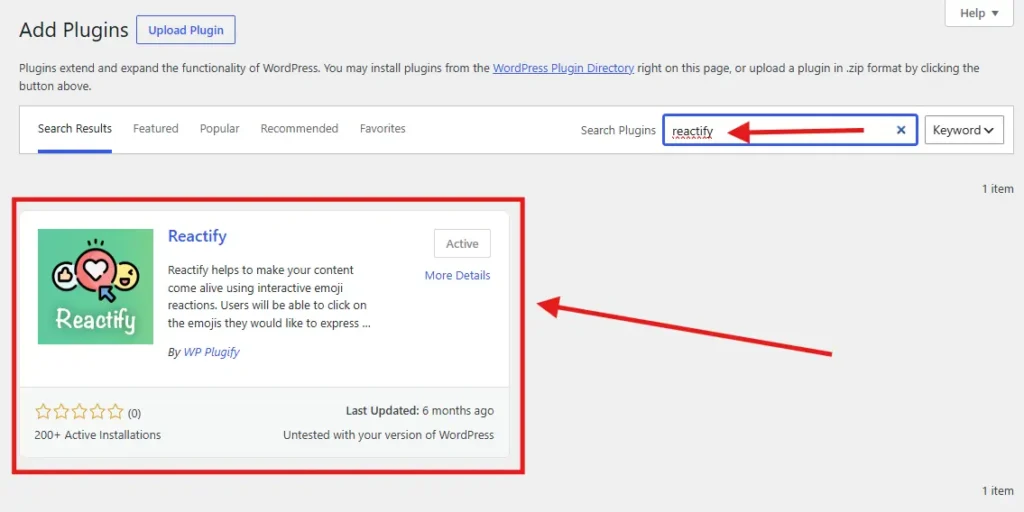
1. Install Reactify. From your WordPress dashboard, go to Plugins → Add New, search for Reactify, install, and activate. It’s also listed in the official WordPress Plugin Directory.
2. Configure your reactions. Open the Reactify settings and pick which emojis to show, then adjust the appearance to fit your site.
3. Place it where it makes sense. For most blogs, the end of the article works best—readers have already finished the content and are ready to respond.
4. Publish. Once it’s live, visitors start reacting, and the counts start building.
Learn more about Reactify and its outstanding features
Reactions vs. Comments: Which Is Better?
You do not necessarily have to choose one.
Comments and reactions serve different purposes yet are there to increase user engagement.
Comments are better when you want detailed opinions, discussions, questions, and conversations.
Reactions are better when you want fast feedback.
Think of them this way:
| Interaction | Best for |
|---|---|
| Comments | Detailed feedback |
| Likes | Simple approval |
| Emoji reactions | Expressing different emotions |
| Shares | Distributing content |
| Reaction counts | Quick audience feedback |
Running reactions alongside comments gives readers more than one way to engage—some will still write paragraphs, most won’t, and now they don’t have to.
Can Reactions Actually Improve User Engagement?
They make interaction easier—that’s different from claiming they’ll move your rankings. Google isn’t going to rank a page higher because it has emoji buttons.
What they can do is capture the readers who would’ve left silently, which still counts as user engagement. Someone who wouldn’t write a comment might still tap “Helpful.” That’s a real engagement signal, even if it’s not an SEO one.
The catch: don’t overdo it. A reaction bar should sit quietly at the end of a post, not compete with the content for attention.
Why Emoji Reactions from Reactify Can Be a Better Fit Than a Simple Like Button
A ‘Like‘ button gives one option. Real reactions to an article are rarely that flat—a reader might find a piece helpful, funny, surprising, or genuinely inspiring, and a single thumbs-up can’t tell you which.
Reactify’s multiple reaction types capture that difference instead of flattening every response into the same click.
A reader might not simply “like” an article. They might find it:
- Helpful
- Funny
- Interesting
- Surprising
- Exciting
- Inspiring
That makes emoji reactions for WordPress a more expressive interaction model.
Reactify is built around this idea by providing multiple reaction options instead of limiting visitors to a single response.
Who Should Use a WordPress Reaction Plugin?
Reactify can be particularly useful if you run:
| Type of Websites | Reason |
|---|---|
| WordPress Blogs | Give readers a quick way to respond to articles without requiring them to write comments. |
| News Websites | Let readers express their immediate reaction to news stories and opinion pieces. |
| Magazine Websites | Use different reactions to make articles more interactive. |
| Tutorial Websites | Find out which tutorials readers find useful or interesting. |
| Review Websites | Allow visitors to express their response to reviews, products, movies, software, or other topics. |
| Community Websites | Add another lightweight interaction method alongside comments and discussions. |
Keep Your Reaction System Simple
More emoji reactions isn’t automatically better. A good reaction bar is easy to understand at a glance, loads fast, works on mobile, and doesn’t fight your site’s design for attention. Reactify sticks to that: pick an emoji, click once, and see the count.
A reaction interface should be:
- Easy to understand
- Fast to use
- Mobile-friendly
- Visually consistent
- Unobtrusive
- Relevant to your content
The best reaction system is one visitors understand immediately.
Reactify focuses on this simple interaction model: choose an emoji, click once, and see the reaction count.
Turn Your WordPress Content Into a Two-Way Experience
Publishing content is only one part of running a successful website.
The next step is creating opportunities for visitors to participate.
Comments, forms, polls, social sharing, and reactions can all contribute to a more interactive website.
If you want a simple way to add WordPress post reactions, Reactify gives you an easy starting point without requiring you to develop a custom reaction system.
Instead of ending every article with a silent “Thanks for reading,” give your visitors a simple question:
“What’s your reaction?”
Sometimes, one click is all it takes to turn a passive reader into an active participant.
Final Thoughts
A successful WordPress website is not only about publishing great content. It is also about making it easy for visitors to interact with that content.
Reactify brings interactive emoji reactions to WordPress, giving readers a quick way to express their feelings while giving site owners another engagement signal.
With multiple emojis, reaction counts, customization options, spam filtering, and simple setup, it can be a practical addition to blogs, news websites, magazines, tutorials, and other content-driven WordPress sites.
If your goal is to increase WordPress user engagement and make your content more interactive, adding a reaction system is a simple feature worth considering.
Give your readers more than a place to read. Give them a way to react.
Read More from Us:
Related Articles
How to Optimize Your WordPress Database for Peak Performance
Learning how to efficiently optimize your WordPress database can be a great hack for your website for peak performance and...